POWER UP
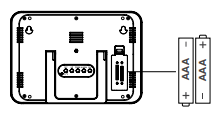
• Install 2-AAA batteries into your clock.
• For detailed instructions on how to power up your clock, please review the full manual at: http://bit.ly/W88631
SETTINGS
1. Hold the SET °F/°C button to enter the settings menu.
2. Press the UP or DOWN buttons to adjust the values.
3. Press the SET °F/°C button to confirm adjustments and move
to the next item.
Settings Menu Order:
1. WWVB time signal (On/Off)
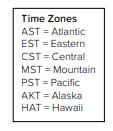
2. Time Zone - 7 time zones
3. DST (Daylight Saving Time On/Off)
4. Hour
5. Minutes
6. Year
7. Month
8. Date
WWVB ATOMIC TIME
- The clock will search for WWVB Atomic time signal for 8 minutes after batteries are installed. Tower flashes.
- If can receive the signal within these 8 minutes, it will only search after midnight every day.
(UTC 7:00, 8:00, 9:00, 10:00, 11:00) - If it can not receive the signal within these 8 minutes, it will search every 2 hours (8 minutes per time) until it receives, then start to search after midnight every day.
- Hold the DOWN for 3 seconds to start or stop a search for the WWVB Atomic Time signal.
- For information about WWVB Atomic Time visit: http://bit.ly/AtomicTime
OTHER BUTTON FUNCTIONS
ALARM: Hold to enter alarm settings. “AL” will show. Use UP and DOWN buttons to adjust. Press ALARM to confirm.
ALARM: Press to view alarm time. Press again to activate or deactivate time alarm.
SNZ: When alarm sounds press SNZ to silence alarm for 10 minutes. Zz will flash.
SET °F/°C: Press to select Fahrenheit or Celsius temperature display.